[TIL] Connecting AI model
06/18/23
![[TIL] Connecting AI model](/_next/image?url=https%3A%2F%2Fcdn.hashnode.com%2Fres%2Fhashnode%2Fimage%2Fupload%2Fv1688371434078%2Fa780dcf9-6ce6-4e19-b0a2-e83792ccbc89.png&w=3840&q=75)
📌 What I tried
1. Using TensorFlow.js and related modules to import Keras h5 model in a TypeScript environment
Unable to use .h5 model and .pkl tokenizer in Node.js environment, so conversion to .json format is required.
import tensorflowjs as tfjs
from tensorflow.keras.models import load_model

model = load_model('rnn_model_v3.h5')
tfjs.converters.save_keras_model(model, './predict_emergency_level_model')
The above code converts the .h5 model into a .json file that can be recognized by tensorflow.js.
Issue #1
- Problem: Error encountered during the installation of the
tensorflowjsmodule:
Collecting flax>=0.5.3 (from tensorflowjs)
  Using cached flax-0.5.3-py3-none-any.whl (202 kB)
ERROR: Cannot install flax because these package versions have conflicting dependencies.

The conflict is caused by:
    optax 0.1.5 depends on jaxlib>=0.1.37
    optax 0.1.4 depends on jaxlib>=0.1.37
    optax 0.1.3 depends on jaxlib>=0.1.37
    optax 0.1.2 depends on jaxlib>=0.1.37
    optax 0.1.1 depends on jaxlib>=0.1.37
    optax 0.1.0 depends on jaxlib>=0.1.37
    optax 0.0.91 depends on jaxlib>=0.1.37
    optax 0.0.9 depends on jaxlib>=0.1.37
    optax 0.0.8 depends on jaxlib>=0.1.37
    optax 0.0.6 depends on jaxlib>=0.1.37
    optax 0.0.5 depends on jaxlib>=0.1.37
    optax 0.0.3 depends on jaxlib>=0.1.37
    optax 0.0.2 depends on jaxlib>=0.1.37
    optax 0.0.1 depends on jaxlib>=0.1.37

To fix this you could try to:
1. loosen the range of package versions you've specified
2. remove package versions to allow pip attempt to solve the dependency conflict

ERROR: ResolutionImpossible: for help visit https://pip.pypa.io/en/latest/topics/dependency-resolution/#dealing-with-dependency-conflicts
Solution: Referenced GitHub issue
Conclusion: Installed with
pip install --no-deps tensorflowjscommand.
Issue #2
- Problem: Error encountered during the installation of the
tensorflow_decision_forestsmodule:
ERROR: Could not find a version that satisfies the requirement tensorflow-decision-forests>=1.3.0 (from tensorflowjs) (from versions: none)
ERROR: No matching distribution found for tensorflow-decision-forests>=1.3.0 (from tensorflowjs)
Solution:
Referenced TensorFlow official documentation
Tried to install the problematic module with the command
pip3 install tensorflow_decision_forests --upgrade, but encountered the above error. Decided to use thetensorflow/buildDocker image.Executing Python files in the Docker container
tensorflow/build2-1. Pulled the Docker image with the command
docker pull tensorflow/build:latest-python3.8. 2-2. Executed the image to start the container with the commanddocker run -it tensorflow/build:latest-python3.8 bash. 2-3. Accessed the Docker container through the above command and set up the Python virtual environment. 2-4. Installed the module with the commandpip install tensorflow_decision_forestsinside the Docker container. (Also downgraded the numpy module version during the process.)
Conclusion: Installed the
tensorflow_decision_forestsmodule in thetensorflow/buildDocker container environment.
Issue #3
Problem: Bringing local files into the Docker container and running them
Solution:
Used the command
docker cp [absolute path of the local file to be saved] [container_name]:[path to save in the container](docker cp C:/Users/siwon/Desktop/Voyage99/projects/CodeBlue-AI-server/rnn_model_v3.h5 hungry_jones:/app) to load the local files (.h5 model file and the py file to be executed) into the Docker container.Additionally, installed
tensorflowjs,tensorflow-hub, andjaxlib.Executed the Python file with the command
python [filename.py]. The "predict_emergency_level_model" folder was created as intended.Used the following command to load the generated files back into our local environment from the container:
docker cp [container_name]:[file path to be retrieved from the container] [absolute path to be saved in the local environment](docker cp hungry_jones:/app/predict_emergency_level_model C:/Users/siwon/Desktop/Voyage99/projects/CodeBlue-AI-server). The intended .bin and .json files were successfully loaded.
- Conclusion: Successfully used Docker commands to bring local files into the Docker container and run them.
Issue #4
Problem: Converting .pkl tokenizer to .json format
Solution:
import pickle
import json

# Load tokenizer from the pickle file
with open('tokenizer.pkl', 'rb') as f:
    tokenizer = pickle.load(f)

# Save the tokenizer's word_index as a json file
with open('tokenizer.json', 'w') as f:
    json.dump(tokenizer.word_index, f)
- Conclusion: Executed the Python file locally to resolve the issue.
Issue #5
Problem: Running the model and tokenizer in our Nest project using Flask
Solution: To verify whether the code works correctly, I tested it with JavaScript:
const tf = require("@tensorflow/tfjs");
const fs = require("fs");

// Preprocessing constants
const MAX_LEN = 18;
const STOPWORDS = ["의","로","을","가","이"];

// Load the existing model and tokenizer
const modelPath =
  "file://C:/Users/siwon/Desktop/Voyage99/projects/CodeBlue-AI-server/predict_emergency_level_model/model.json";
const tokenizerPath =
  "C:/Users/siwon/Desktop/Voyage99/projects/CodeBlue-AI-server/tokenizer.json";

async function loadModel(modelPath) {
  const model = await tf.loadLayersModel(modelPath);
  return model;
}

// Load the file
let tokenizer;
fs.readFile(tokenizerPath, "utf8", (err, data) => {
  if (err) {
    console.error("Unable to read the file:", err);
    return;
  }

  tokenizer = JSON.parse(data);
});

// Sentence prediction
async function emergencyLevelPrediction(sampleSentence) {
  // Load the model
  const model = await loadModel(modelPath);

  // Preprocess the sample sentence (tokenization, remove stopwords)
  let sampleSentenceArr = sampleSentence.split(" ");
  sampleSentenceArr = sampleSentenceArr.filter(
    (word) => !STOPWORDS.includes(word)
  );
  // Tokenize and pad the sample sentence
  const encodedSample = sampleSentenceArr.map(
    (word) => tokenizer.word_index[word] || 0
  );
  const paddedSample = padSequences([encodedSample], MAX_LEN, "post");
  // Predict emergency level for the sample sentence
  const prediction = model.predict(tf.tensor2d(paddedSample));
  let emergencyLevel;
  let confidence;

  if (!Array.isArray(prediction)) {
    emergencyLevel = prediction.argMax(-1).dataSync()[0] + 1;
    confidence = prediction.dataSync()[emergencyLevel - 1];
  }
  console.log(`Emergency level: ${emergencyLevel}, Confidence: ${confidence * 100.0}%`);
}

function padSequences(
  sequences,
  maxLen,
  padding = "post",
  truncating = "post",
  value = 0
) {
  return sequences.map((seq) => {
    // Truncate
    if (seq.length > maxLen) {
      if (truncating === "pre") {
        seq.splice(0, seq.length - maxLen);
      } else {
        seq.splice(maxLen, seq.length - maxLen);
      }
    }
    // Pad
    if (seq.length < maxLen) {
      const pad = [];
      for (let i = 0; i < maxLen - seq.length; i++) {
        pad.push(value);
      }
      if (padding === "pre") {
        seq = pad.concat(seq);
      } else {
        seq = seq.concat(pad);
      }
    }
    return seq;
  });
}

// Example sentence
emergencyLevelPrediction(
  "응급환자는 심장마비로 인해 의식을 잃고 쓰러졌습니다. 호흡 곤란 상태입니다."
); // Expected: 1
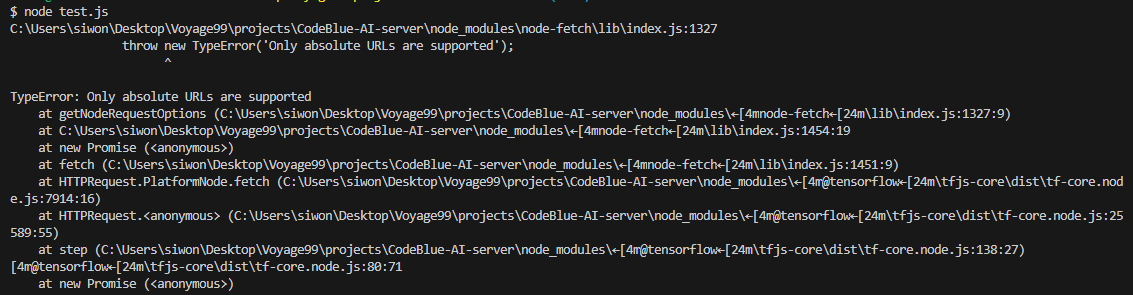
At this point, I encountered an error related to absolute file paths. I tried modifying the model path from "C:/" to "file://C:/" to address the error, but it was not resolved.
- Conclusion: Unable to resolve the error related to absolute file paths.
🤚 Stop here
I continued attempting to fix the error at this point, but it was time for my mentoring session with the senior coach. During the session, I asked how we could connect the AI model to our project in the desired way, and the coach mentioned that the approach I was trying would introduce dependencies, which should be avoided. Instead, it was suggested to create a separate server for running the model and make it part of the MSA (Microservices Architecture) of our project.
2. Building a Python Flask server to run the AI model, and connecting the model to the Nest project using the Flask server
This is the task to be done.
![[코테] 그리디 문제 - 무지의 먹방 라이브](/_next/image?url=https%3A%2F%2Fcdn.hashnode.com%2Fres%2Fhashnode%2Fimage%2Fupload%2Fv1712215455263%2F1ac1f35a-8862-4e42-8d0c-e2bea01e04c0.png&w=3840&q=75)
![[코테] Bfs 토마토](/_next/image?url=https%3A%2F%2Fcdn.hashnode.com%2Fres%2Fhashnode%2Fimage%2Fupload%2Fv1709032619170%2F70056896-c857-444b-9c99-45bfcb466806.png&w=3840&q=75)
![[코테] Dfs 문제 유형 - 그래프 내에서 구분하여 카운트 하기](/_next/image?url=https%3A%2F%2Fcdn.hashnode.com%2Fres%2Fhashnode%2Fimage%2Fupload%2Fv1709019361383%2Fb0585d72-c808-4169-83a9-2724f312e927.png&w=3840&q=75)
![[코테] DFS vs BFS](/_next/image?url=https%3A%2F%2Fcdn.hashnode.com%2Fres%2Fhashnode%2Fimage%2Fupload%2Fv1708971211123%2F71f9386c-6a62-43b2-a602-4d084c24d6cf.png&w=3840&q=75)
![[코테] 여행경로](/_next/image?url=https%3A%2F%2Fcdn.hashnode.com%2Fres%2Fhashnode%2Fimage%2Fupload%2Fv1708971251412%2F27ce72ed-8ee7-4d13-a02f-ff4bbe50c4be.png&w=3840&q=75)