[Node] Database and MongoDB
04/15/23
![[Node] Database and MongoDB](/_next/image?url=https%3A%2F%2Fcdn.hashnode.com%2Fres%2Fhashnode%2Fimage%2Fupload%2Fv1681536556599%2F8ae026ad-8009-4307-ad8d-726523b7d973.png&w=3840&q=75)
What is Database?
Software designed to efficiently store and retrieve data is called a Database Management System (DBMS).
The server computer where the DBMS is installed can be referred to as the Database Server (DB Server).
When people commonly say "data is stored in a database," they are referring to the fact that the data is managed by the DBMS on the DB Server.
Two types of DB
Relational Database (RDB): A type of database that focuses on maintaining data with defined formats and relationships among data to ensure consistency and integrity of data is called a relational database.
- Consistency and integrity of data: data with high integrity and consistency.
Non-relational Database (NoSQL): Any type of database that does not belong to the relational database category is referred to as a non-relational database or NoSQL database. Non-relational databases are flexible in terms of data format and can be scaled easily, but if data is not properly managed, the data stored in the database may become unreliable.
- This type of database is often adopted by many startups for its flexibility in design.
What is MongoDB?
One of the most popular NoSQL databases used by many developers domestically and internationally.
All data is stored in JSON format.
It has the advantage of easily storing complex structures.
It is available for free to use.
It can easily scale up or down.
Relationship between Web Server and DB Server
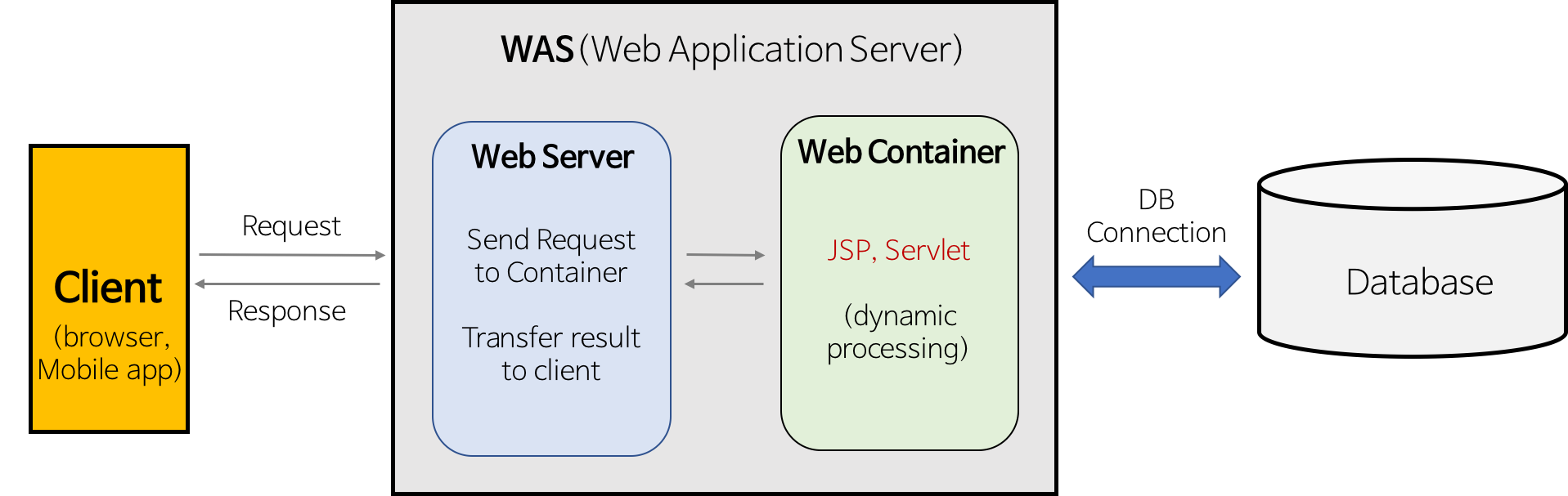
The web server provides the data and functionalities requested by the web client.
The DB server stores data for optimal performance and provides the data requested by the DB client.
Ultimately, the two servers differ only in what they provide, but their basic principles are similar.
MongoDB
MongoDB Client - Studio 3T
Studio 3T is a MongoDB client designed to assist with using MongoDB, similar to an API client that helps with API usage.
Studio 3T is a program that provides an easy-to-use GUI for managing data stored in MongoDB, displaying it in a user-friendly manner.
CRUD Command in MongoDB
find:
db.collectionName.find({})insert one:
db.collectionName.insertOne({ key: "value", key2: "값" })delete one:
db.collectionName.deleteOne({ _id: ObjectId("...")})update one:
db.collectionName.updateOne({ _id: ObjectId("...")}, {$set : {attribute}})
Mongoose
Document in mongoose
A document in
mongooserefers to each individual piece of data that is stored in MongoDB.It consists of one or more key-value pairs, in JSON format.
{
    "_id": ObjectId("6682192a1c155bd2f27881"),
    "name": "lyw",
}
Collection in mongoose
- A collection in
mongooseis similar to a table in relational databases and can hold multiple documents in JSON format.
Schema in mongoose
A schema in
mongoosedefines what type of values can be included in the documents of a collection.It is used for modeling data and specifies the structure of the data.
❓ Some common types in a schema are:
null: for null values or non-existent fields- ex:
null
- ex:
String: for strings- ex:
"mongoDB"
- ex:
Number: for numbers- ex:
3.14
- ex:
Date: for dates- ex:
new Date()
- ex:
Buffer: for buffers that can hold files or non-UTF-8 encoded strings- ex:
0x65
- ex:
Boolean: fortrueorfalse- ex:
true
- ex:
ObjectId(Schema.Types.ObjectId): for object IDs, often used for referencing other objects- ex:
ObjectId()
- ex:
Array: for arrays of values- ex:
["a", "b", "c"]
- ex:
Model in mongoose
A model in
mongooseis responsible for defining the structure of data that will be stored in the database.It is created using a schema and provides functions to perform operations on MongoDB.
It is used to create documents when storing data.
![[코테] 그리디 문제 - 무지의 먹방 라이브](/_next/image?url=https%3A%2F%2Fcdn.hashnode.com%2Fres%2Fhashnode%2Fimage%2Fupload%2Fv1712215455263%2F1ac1f35a-8862-4e42-8d0c-e2bea01e04c0.png&w=3840&q=75)
![[코테] Bfs 토마토](/_next/image?url=https%3A%2F%2Fcdn.hashnode.com%2Fres%2Fhashnode%2Fimage%2Fupload%2Fv1709032619170%2F70056896-c857-444b-9c99-45bfcb466806.png&w=3840&q=75)
![[코테] Dfs 문제 유형 - 그래프 내에서 구분하여 카운트 하기](/_next/image?url=https%3A%2F%2Fcdn.hashnode.com%2Fres%2Fhashnode%2Fimage%2Fupload%2Fv1709019361383%2Fb0585d72-c808-4169-83a9-2724f312e927.png&w=3840&q=75)
![[코테] DFS vs BFS](/_next/image?url=https%3A%2F%2Fcdn.hashnode.com%2Fres%2Fhashnode%2Fimage%2Fupload%2Fv1708971211123%2F71f9386c-6a62-43b2-a602-4d084c24d6cf.png&w=3840&q=75)
![[코테] 여행경로](/_next/image?url=https%3A%2F%2Fcdn.hashnode.com%2Fres%2Fhashnode%2Fimage%2Fupload%2Fv1708971251412%2F27ce72ed-8ee7-4d13-a02f-ff4bbe50c4be.png&w=3840&q=75)