[Node] Intro to Express.js
![[Node] Intro to Express.js](https://cdn.hashnode.com/res/hashnode/image/upload/v1681461481326/40d29c9f-6aec-4d36-952c-e7e50220b470.png)
Express.js
Express.js is a web framework for Node.js that allows developers to create servers quickly and easily.
While there are various web frameworks available for Node.js, currently, the majority of Node.js web servers are developed using the Express.js framework.
Another popular web framework for Node.js that has gained attention recently is Nest.js.
const express = require('express');
const app = express();
const port = 3000;

app.get('/', (req, res) => {
  res.send('Hello World!');
});

app.listen(port, () => {
  console.log(port, `You are using ${port} port`);
});
API Client
An API client is a tool that helps with verifying and testing requests made to APIs during the development process. By using an API client, developers can increase development speed and prevent critical errors.
Tools: Postman, Insomnia, Thunder Client (available as VScode Extension)
Routing & Router
Routing: It refers to the way of responding to client requests, including the method, address, and other conditions.
Router: A handler for incoming client requests.
router.METHOD(PATH, HANDLER);router: define the router of expressMETHOD: HTTP Methods (GET, POST, PUT, DELETE, ...)PATH: the path for using API on the serverHANDLER: a function that is executed when the router is correct
Middleware:
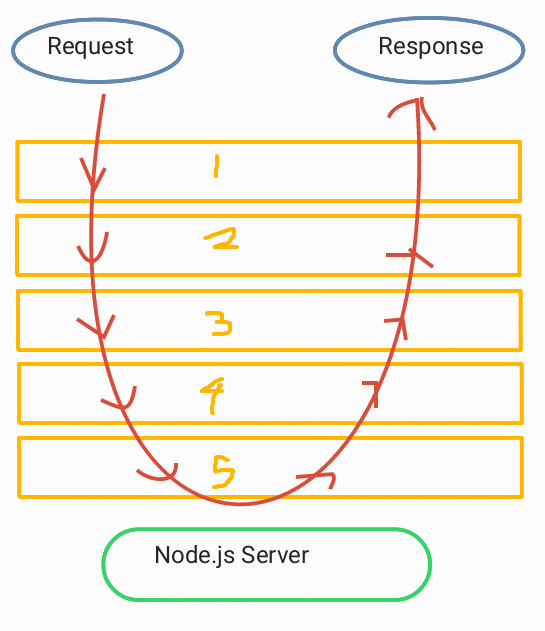
Express is a consecutive chain of middlewares!

Definition: Middleware is a concept in Node.js that refers to a function or set of functions that sits in between the application's request and response objects. It can be used to modify incoming requests or outgoing responses in some way.
In a Node.js application, when a client sends a request to the server, the request goes through a series of middleware functions before it reaches the final route handler. Each middleware function has access to the request and response objects, and can modify them in some way before passing them on to the next middleware function.
- For example, a middleware function might add a header to the response, log information about the request, or authenticate the user making the request.
Usage
Avoid duplicates for common processing: Sometimes, in a web server, there may be a need to apply common processing to all incoming requests. In such cases, middleware can be used to manage common functionalities for request and response handling in a web server.
- For example, you might have a middleware function that adds a header to every response, or one that logs information about every request. By using middleware, you can avoid duplicating this code in every route handler and ensure that it is applied consistently across your application.
Used for more complex processing: Middleware can also be used to perform more complex processing, such as authentication or authorization. For example, you might have a middleware function that checks whether the user making the request is authenticated, and redirects them to a login page if they are not.
Diagram - how middleware works: what is the workflow when the request is coming to the server with five middleware
Modules
Module refers to code separated into JavaScript files.
In this context, a JavaScript file is a collection of functions and variables that serve a specific purpose.
Modules can import and use other modules within the same program.
Modules can be used as components of other programs while also functioning as standalone programs.
Typically, one file corresponds to one module.
Why do we use Modules?
It is possible to segregate the codebase, thereby enabling structural management of the code.
The code becomes reusable, i.e., it is modularized.
Only the interfaces of the modules can be exposed. Thus, it becomes possible to implement information hiding, concealing all information except for the interfaces.
It becomes possible to manage dependencies.
// 1. export function as a module itself
function add(x, y) {
    return x + y;
}

module.exports = add;


// For 2, 3, and 4 require Object Destructuring in the file importing modules

// 2. export function as an object
exports.add = function (x, y) {
    return x + y;
};


// 3. export function as a value of object

function add(a, b) {
    return a + b;
}
module.exports = { add: add };


// 4. export arrow function
const add = (a, b) => {
    return a + b;
};
exports.add = add;
CommonJS (CJS) vs. ECMA Script Modules (ESM)
CJS: the default module system
- It uses the
require()function to load modules and themodule.exportsobject to export them. CommonJS modules are synchronous, which means that the module is loaded and executed before any other code is executed.
- It uses the
ESM: a newer standard for organizing and sharing code in JavaScript
They use the
importandexportstatements to load and export modules. ES modules are asynchronous, which means that they are loaded and executed in the order specified by the dependency graph.ES modules require a flag to be enabled in Node.js versions prior to 14.13.0.
Key Difference: ES modules are statically analyzable, which means that their dependencies can be determined at compile time. CJS determines dependencies at runtime.
When dependencies are determined at runtime, the module loader has to search for and load each module as it is required. This can lead to slower loading times and more overhead.
In contrast, when dependencies are determined at compile time, the module loader can create a dependency graph that specifies the order in which modules should be loaded. This allows for better optimization, as the module loader can load modules in parallel and eliminate unnecessary code.
Then, which one is better?
One advantage of CommonJS is that it has been around for a long time and is widely used, which means that there is a large ecosystem of modules available. Additionally, CommonJS modules are synchronous, which can simplify the code in some cases.
ES modules, on the other hand, have the advantage of being a standard that is supported by all modern browsers and Node.js versions. They are also statically analyzable, which allows for better optimization and tooling support.
In general, if you are starting a new project or working on a project that requires modern JavaScript features, using ES modules is a good choice. However, if you are working on an existing project that uses CommonJS modules, it may be more practical to stick with CommonJS to avoid breaking existing code.
Request & Response
"Request" refers to an object that contains information or messages that a client wants to send to a server.
"Response" refers to an object that sends response messages from a server to a client.
Server Module
Express module - extended HTTP module
req&resobjects-
req.app: Allows access to the app object through the req object.
req.ip: Contains the IP address of the requesting client.
req.body (Body): Contains the information sent in the request body when calling the Request.
You need to use the
express.json()orexpress.urlencoded()middleware to access this object (key-value pair).Unlike Path Variable and Query String, you can't check what data is set when using URL only.
Used with
POST,PUTmethods for creating and sending data that is subject to change- eg. user ID, user password, post title
req.params (Path Variable): Contains information you want to deliver in URL about route parameters in the form of an object.
/user/:name-> bring params withreq.params.nameUsed when selecting specific post or assign the clear resource
- eg. lookup detailed info of the post or user
req.query (Query String): Contains information sent as query strings (in the URL with
?and&) in the request when calling the Request.Put question mark after URL ->
/user?name=Siwon-Kim&age=22Used when marking the location of the content or giving specific option on webpage
- eg. sorting or filtering feature
req.cookies: Contains the cookie information sent in the request.
- You need to use the
cookie-parsermiddleware to access this object.
- You need to use the
req.get(Header): Used to retrieve values stored in headers.
-
res.app: Allows access to the app object through the res object.
res.status(code): Specifies the HTTP status code in the response.
res.send(data): Sends data as the response.
res.json(JSON): Sends the response in JSON format.
res.end(): Sends an empty response without data.
res.redirect(url): Sends a response with a redirect URL.
res.cookie(key, value, options): Sets a cookie in the response.
res.clearCookie(key, value, options): Removes a cookie from the response.
-
Which one should I use: Path Variable or Query Parameter?
If you want to identify a resource, it is best practice to use Path Variables
If you want to perform sorting or filtering, it is best practice to use Query Parameters.
/users  // get users list
/users?occupation=programmer  // Query: get users who are programmer
/users/123  // Params: get user whose id is 123
API & REST API
API: Application Programming Interface
API that we write should provide the URL and interface to perform the desired functionality in a web application (frontend).
By receiving the desired data in our API, storing the data in a database, and reading the stored data to provide data to the web application (frontend), we can achieve the user's desired goal.
REST(ful) API: Representational State Transfer
REST API = API that is following "REST architecture" = REST determines how the API looks like
In simple terms, REST architecture defines the network representation means such as URL, Headers, and Method in a way that is easy to understand for humans. It also presents the principle of defining "resources" in a way that is easy to understand for humans, and organizing representations around these "resources".

REST API consists of three parts
Resource - URL
- Everything that the software manages can be a resource
Verb - HTTP method
CRUD
Create : POST
Read : GET
Update : PUT, PATCH
Delete : DELETE
Difference between PUT and PATCH
Update granularity: PUT updates a resource as a whole, while PATCH allows for partial updates.
Idempotency: the property that performing the same operation multiple times does not change the result. For example, if a function f(x) is idempotent, then f(f(x)) = f(x). In computer science, it is important to note that the HTTP methods PUT and DELETE are idempotent, meaning that sending the same request multiple times will return the same result and not change the server's state.
- PUT is idempotent, which means that making multiple identical PUT requests will have the same result as making a single PUT request. This is because the resource will be updated to the same state regardless of how many times the request is repeated. In contrast, PATCH is not necessarily idempotent, as multiple identical PATCH requests may have different outcomes depending on the order in which they are applied.
Error handling: PUT requests may overwrite existing data on the server with the provided data, even if some fields are missing or not provided. PATCH, on the other hand, applies updates partially, and any missing fields are not updated. This means that if you want to update a resource and provide only the changed fields, PATCH is a better choice as it allows for more fine-grained error handling.
Performance: PATCH requests are generally more efficient in terms of bandwidth and processing compared to PUT requests. Since PATCH only requires sending the changes, it can be more lightweight and faster when updating large resources with minimal changes.
Representations
Show how the resource will be expressed
Usually use JSON, XML type
In HTTP, we use
Content-Type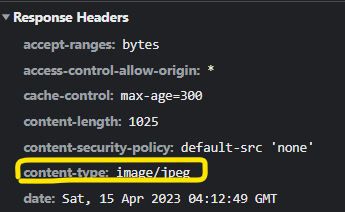
Example of REST API

router.get('/movies', (req, res) => {
    res.json({ success: true, data: getAllMovies() });
});
From the perspective of REST API, it is possible to distinguish resources using URLs, and the absence of other representations may imply retrieving the entire list. Additionally, representing the CRUD operation of "Read" using HTTP methods can be considered as a RESTful API.
![[코테] 그리디 문제 - 무지의 먹방 라이브](https://cdn.hashnode.com/res/hashnode/image/upload/v1712215455263/1ac1f35a-8862-4e42-8d0c-e2bea01e04c0.png)
![[코테] Bfs 토마토](https://cdn.hashnode.com/res/hashnode/image/upload/v1709032619170/70056896-c857-444b-9c99-45bfcb466806.png)
![[코테] Dfs 문제 유형 - 그래프 내에서 구분하여 카운트 하기](https://cdn.hashnode.com/res/hashnode/image/upload/v1709019361383/b0585d72-c808-4169-83a9-2724f312e927.png)
![[코테] DFS vs BFS](https://cdn.hashnode.com/res/hashnode/image/upload/v1708971211123/71f9386c-6a62-43b2-a602-4d084c24d6cf.png)
![[코테] 여행경로](https://cdn.hashnode.com/res/hashnode/image/upload/v1708971251412/27ce72ed-8ee7-4d13-a02f-ff4bbe50c4be.png)