[TIL] What I Newly Learned (feat. CI/CD)
05/11/23
![[TIL] What I Newly Learned (feat. CI/CD)](/_next/image?url=https%3A%2F%2Fcdn.hashnode.com%2Fres%2Fhashnode%2Fimage%2Fupload%2Fv1688360954635%2F81c3d9b6-3178-4054-a919-e3910be10dad.png&w=3840&q=75)
📌 What I newly learned
- git stash
: Temporary storage for changes
- git rebase
: Rearranges, combines, or eliminates commits in one branch by applying them to another branch. Typically used to clean up or combine commit history between branches.
-
- You can use right-click to paste while in input mode.
- Using pm2
- pm2 restart [idNumber]: Restart the currently running pm2 service. - pm2 list: List the services managed by pm2. - pm2 delete [pid number]: Stop the currently running pm2 service. - pm2 log: Display the logs of the executed services. It can also display error messages, making it useful for debugging. - pm2 logs --lines [number]: Output the last [number] of logs in chronological order.
- Github Action -> CI/CD
Encountered an error because the
.envfile was not being read.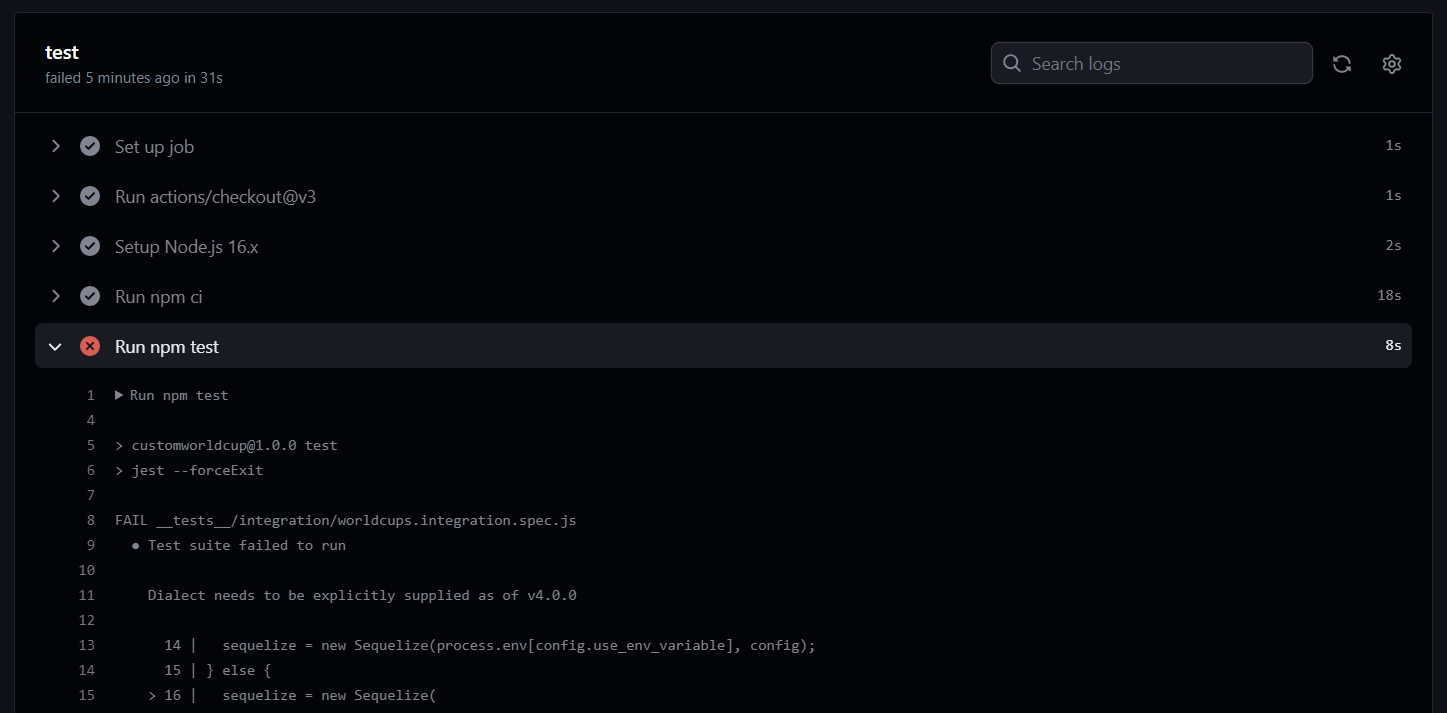
To use dotenv in Github Action, you need to add the environment variables to the repository.
Repository > Settings > Security > Actions > New Repository Secret button
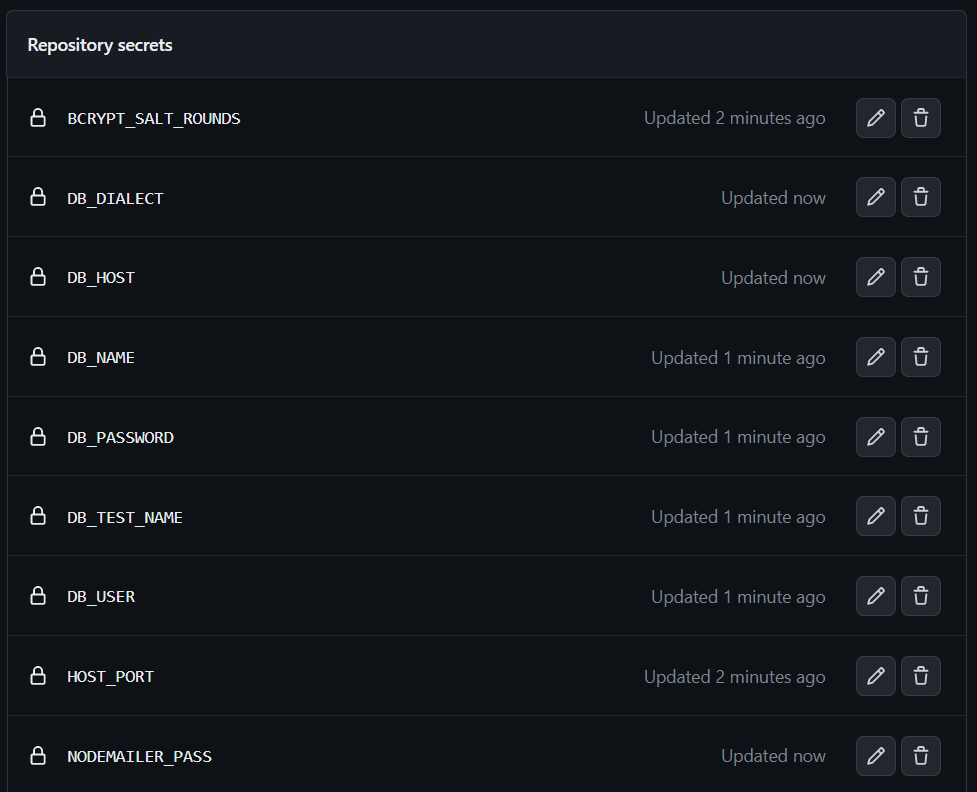
Add all the environment variables used in the workflow.
These variables can be accessed in the action workflow using syntax like
echo "SECRET_KEY=${{ secrets.SECRET_KEY }}" >> .env.Modify the .yml file accordingly.
name: Node.js CI

on:
  push:
    branches: [ "main" ]
  pull_request:
    branches: [ "main" ]

jobs:
  test:
    runs-on: ubuntu-latest

    steps:
    - uses: actions/checkout@v3
    - name: Setup Node.js 16.x
      uses: actions/setup-node@v3
      with:
        node-version: 16.x
        cache: 'npm'
    - name: Load env file
      run: |
        touch .env
        echo "SECRET_KEY=${{ secrets.SECRET_KEY }}" >> .env
        echo "REFRESH_EXPIRES=${{ secrets.REFRESH_EXPIRES }}" >> .env
        echo "ACCESS_EXPIRES=${{ secrets.ACCESS_EXPIRES }}" >> .env
        echo "BCRYPT_SALT_ROUNDS=${{ secrets.BCRYPT_SALT_ROUNDS }}" >> .env
        echo "HOST_PORT=${{ secrets.HOST_PORT }}" >> .env
        echo "DB_TEST_NAME=${{ secrets.DB_TEST_NAME }}" >> .env
        echo "DB_USER=${{ secrets.DB_USER }}" >> .env
        echo "DB_PASSWORD=${{ secrets.DB_PASSWORD }}" >> .env
        echo "DB_NAME=${{ secrets.DB_NAME }}" >> .env
        echo "DB_HOST=${{ secrets.DB_HOST }}" >> .env
        echo

 "DB_DIALECT=${{ secrets.DB_DIALECT }}" >> .env
        echo "NODEMAILER_USER=${{ secrets.NODEMAILER_USER }}" >> .env
        echo "NODEMAILER_PASS=${{ secrets.NODEMAILER_PASS }}" >> .env
        echo "NODEMAILER_SERVICE=${{ secrets.NODEMAILER_SERVICE }}" >> .env
    - name: Install Dependencies
      run: npm ci
    - run: npm test
During this process, I encountered the following error multiple times, which was caused by not creating the test database. To resolve it, create the test database with
npx sequelize db:create --env test!All the tests passed, but I got this error. It seems like the address is already in use because the server is running with pm2. How do I resolve this...? It will be my next challenge...
📌 What to learn next
- Resolve the error in the previous Github Action and complete the CI/CD setup.
![[코테] 그리디 문제 - 무지의 먹방 라이브](/_next/image?url=https%3A%2F%2Fcdn.hashnode.com%2Fres%2Fhashnode%2Fimage%2Fupload%2Fv1712215455263%2F1ac1f35a-8862-4e42-8d0c-e2bea01e04c0.png&w=3840&q=75)
![[코테] Bfs 토마토](/_next/image?url=https%3A%2F%2Fcdn.hashnode.com%2Fres%2Fhashnode%2Fimage%2Fupload%2Fv1709032619170%2F70056896-c857-444b-9c99-45bfcb466806.png&w=3840&q=75)
![[코테] Dfs 문제 유형 - 그래프 내에서 구분하여 카운트 하기](/_next/image?url=https%3A%2F%2Fcdn.hashnode.com%2Fres%2Fhashnode%2Fimage%2Fupload%2Fv1709019361383%2Fb0585d72-c808-4169-83a9-2724f312e927.png&w=3840&q=75)
![[코테] DFS vs BFS](/_next/image?url=https%3A%2F%2Fcdn.hashnode.com%2Fres%2Fhashnode%2Fimage%2Fupload%2Fv1708971211123%2F71f9386c-6a62-43b2-a602-4d084c24d6cf.png&w=3840&q=75)
![[코테] 여행경로](/_next/image?url=https%3A%2F%2Fcdn.hashnode.com%2Fres%2Fhashnode%2Fimage%2Fupload%2Fv1708971251412%2F27ce72ed-8ee7-4d13-a02f-ff4bbe50c4be.png&w=3840&q=75)