[TIL] Hackabull 2023
03/25/23
![[TIL] Hackabull 2023](/_next/image?url=https%3A%2F%2Fcdn.hashnode.com%2Fres%2Fhashnode%2Fimage%2Fupload%2Fv1679780773365%2F8d5e6505-37e9-4558-8f9b-838b4415e20a.png&w=3840&q=75)
GitHub Link for Project
Error Fix
The server cannot bring Flask API -> shut down other running servers
Unable to load react-bootstrap
npm install react-bootstrap bootstrapimport {Button, Card} from 'react-bootstrap'; import 'bootstrap/dist/css/bootstrap.min.css'; // This import below didn't work // import Button from 'react-bootstrap/Button'; // import Card from 'react-bootstrap/Card';
requirements.txt in Python
To generate
requirements.txt=>pip freeze > requirements.txtTo download packages in
requirements.txt=>pip install -r requirements.txt
React
Installation
npx create-react-app [proj-name]- Download packages for executing the existing React app:
npm install
- Download packages for executing the existing React app:
Run React server:
npm start
JSX
Embedding Expressions
const name = 'Josh Perez'; const element = <h1>Hello, {name}</h1>;className=, notclass=in HTML tag & function can only return a single root nodereturn ( <> <div className="modal"> <h4>title</h4> <p>date</p> <p>details</p> </div> <div> <p>Hi, it's Siwon</p> </div> </> );Insert
styleinside the tagreturn ( <h4 style={{ color: "red", fontSize: "16px" }}>title</h4> );
State
When the state object changes, the component re-renders
import { useState } from "react";

function Counter() {
    const [count, setCount] = useState(0);
    const onIncrease = () => {
        setCount(count + 1);
    };

    const onDecrease = () => {
        setCount(count - 1);
    };

    return (
        <div>
            <h2>{count}</h2>
            <button onClick={onIncrease}>+</button>
            <button onClick={onDecrease}>-</button>
        </div>
    );
};

export default Counter;
Spread Syntax:
...The Spread Syntax is used to deconstruct an array or object into separate variables where the exact number of elements in the array may not be known or when we wish to keep an attribute or a set of attributes separate from the entire object.
If we want to change array or object states, we should put this
...syntax because the state is declared as an arrow that is pointing to the value in the buffer. So, if we forget to use spread syntax, nothing is going to be changed.let arr = [1, 2, 3];=> arr stores the arrow pointing to the value in RAM, not the value
    function App() {
        let [title, titleChange] = useState(['t3', 't1', 't2']);
        return (
            <div>
                <button
                    onClick={() => {
                        let orderBy = [...title]; // spread syntax
                        orderBy.sort();
                        titleChange(orderBy);
                    }}
                >
            </div>
        )
    }
Components
Components are independent and reusable bits of code. They serve the same purpose as JavaScript functions, but work in isolation and return HTML.
import Counter from "./Counter"; // import Components to App.js

function App() {
    return (
        <>
            <Counter /> // bring Component
        </>
    );
}
Props
Props are arguments passed into React components. Props are passed to components via HTML attributes
import Counter from "./Counter";

function App() {
    const counterProps = {
        a: 1,
        b: 2,
        c: 3,
        initialValue: 4,
    };
    return (
    <>
        <Counter {...counterProps} />
    </>
    );
}

export default App;
import { useState } from "react";

function Counter(props) {
    const [count, setCount] = useState(props.initialValue);
    const onIncrease = () => {
        setCount(count + 1);
    };

    const onDecrease = () => {
        setCount(count - 1);
    };

    return (
        <div>
            <h2>{count}</h2>
            <button onClick={onIncrease}>+</button>
            <button onClick={onDecrease}>-</button>
        </div>
    );
};

Counter.defaultProps = {
    initialValue: 0,
} // we can avoid the error when initialValue is missing in App()

export default Counter;
Container
const Container = ({children}) => {
    return (
        <div style={{ margin: 20, padding: 20, border: '1px solid gray'}}>
            {children}
        </div>
    )
}

export default Container;
import Counter from "./Counter";

function App() {
    return (
    <Container>
        <Counter {...counterProps} />
    </Container>
    );
}

export default App;
useEffect(): fetch API
Add Proxy
Without setting a Proxy, it shows an error

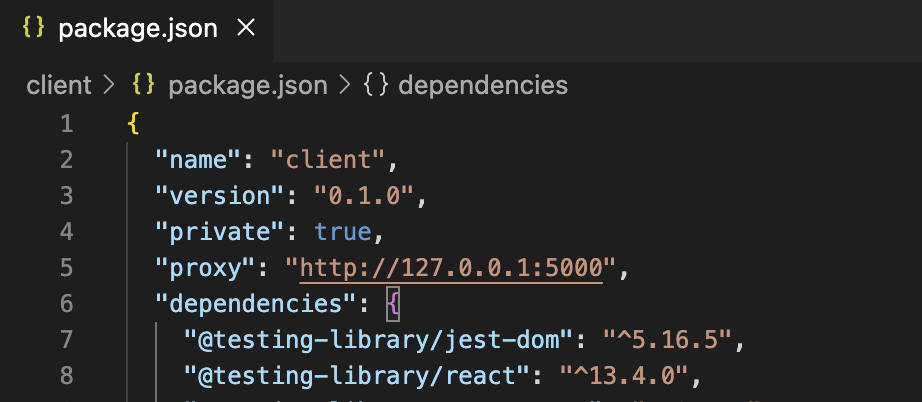
useEffect(): bring data only when the webpage is first executed
useEffect(() => {
    fetch("/apt") // GET data from the url (data contained in http://127.0.0.1:5000/apt)
            .then((res) => res.json())
            .then((data) => {
        setApts(data["apt_info"])
        console.log(apts);
      }).catch(
        err => console.log(err)
      )
    }, []);
Finalized code
  import '../App.css';
  import { useEffect, useState } from "react";
  import { Button, Card } from 'react-bootstrap';
  import 'bootstrap/dist/css/bootstrap.min.css';

  const Cards = () => {
      const [apts, setApts] = useState([{}])

      useEffect(() => {
          fetch("/apt")
              .then((res) => res.json())
              .then((data) => {
          setApts(data["apt_info"])
          console.log(apts);
        }).catch(
          err => console.log(err)
        )
      }, []);

      return (
          <div className="mycards">
              <div id="cards" className="row row-cols-1 row-cols-md-4 g-4">
                  {apts.map((a) => {
                     return (
                      <div className="col">
                          <Card style={{ width: '18rem' }}>
                              <Card.Img className="" variant="top" src={a["image"]} />
                              <Card.Body>
                                  <Card.Title>{a["name"]}</Card.Title>
                                  <Card.Subtitle className="mb-2 text-muted">{a["address"]}</Card.Subtitle>
                                  <Card.Text>{a["price"]}</Card.Text>
                                  <Card.Text>{a["size"]}</Card.Text>
                                  <Button variant="primary" href={a["link"]} style={{ border: '0px', backgroundColor: '#046648' }}>VISIT</Button>
                              </Card.Body>
                          </Card>
                      </div>
                     )
                  })}
              </div>
          </div>
      )
  }

  export default Cards;
![[코테] 그리디 문제 - 무지의 먹방 라이브](/_next/image?url=https%3A%2F%2Fcdn.hashnode.com%2Fres%2Fhashnode%2Fimage%2Fupload%2Fv1712215455263%2F1ac1f35a-8862-4e42-8d0c-e2bea01e04c0.png&w=3840&q=75)
![[코테] Bfs 토마토](/_next/image?url=https%3A%2F%2Fcdn.hashnode.com%2Fres%2Fhashnode%2Fimage%2Fupload%2Fv1709032619170%2F70056896-c857-444b-9c99-45bfcb466806.png&w=3840&q=75)
![[코테] Dfs 문제 유형 - 그래프 내에서 구분하여 카운트 하기](/_next/image?url=https%3A%2F%2Fcdn.hashnode.com%2Fres%2Fhashnode%2Fimage%2Fupload%2Fv1709019361383%2Fb0585d72-c808-4169-83a9-2724f312e927.png&w=3840&q=75)
![[코테] DFS vs BFS](/_next/image?url=https%3A%2F%2Fcdn.hashnode.com%2Fres%2Fhashnode%2Fimage%2Fupload%2Fv1708971211123%2F71f9386c-6a62-43b2-a602-4d084c24d6cf.png&w=3840&q=75)
![[코테] 여행경로](/_next/image?url=https%3A%2F%2Fcdn.hashnode.com%2Fres%2Fhashnode%2Fimage%2Fupload%2Fv1708971251412%2F27ce72ed-8ee7-4d13-a02f-ff4bbe50c4be.png&w=3840&q=75)