[Redis] How to Use Redis in Node.js
![[Redis] How to Use Redis in Node.js](/_next/image?url=https%3A%2F%2Fcdn.hashnode.com%2Fres%2Fhashnode%2Fimage%2Fupload%2Fv1682425274557%2F95f40b55-546f-4148-803f-18600eaf6893.png&w=3840&q=75)
Redis
What is Redis?
Redis is a cache system and in-memory database that stores data in a key-value format. Since in-memory databases store all data in memory, they are much faster than retrieving data from a traditional DBMS. Redis utilizes a data structure called Sorted-Set to sort data more quickly and easily.
I wanted to use Redis to store refresh tokens. I tried to use the elastic cache provided by AWS, but it charged me. I also tried to download redis-server directly to EC2 and connect it, but it didn't work. Finally, I found a solution in Redislabs, which provides a free Redis DB with a size limit of 30MB.
How to Connect Redis with Node.js Project
Click Try Free and sign up in Redislabs
Select AWS and Region: US East (N.Virginia) us-east-1
You can now see the free DB is created.
Under Name, we can see important information we are going to use in the project.
host, post: we can copy host and port info. For host, we should omit the port number at the end of the endpoint (e.g.
:19231)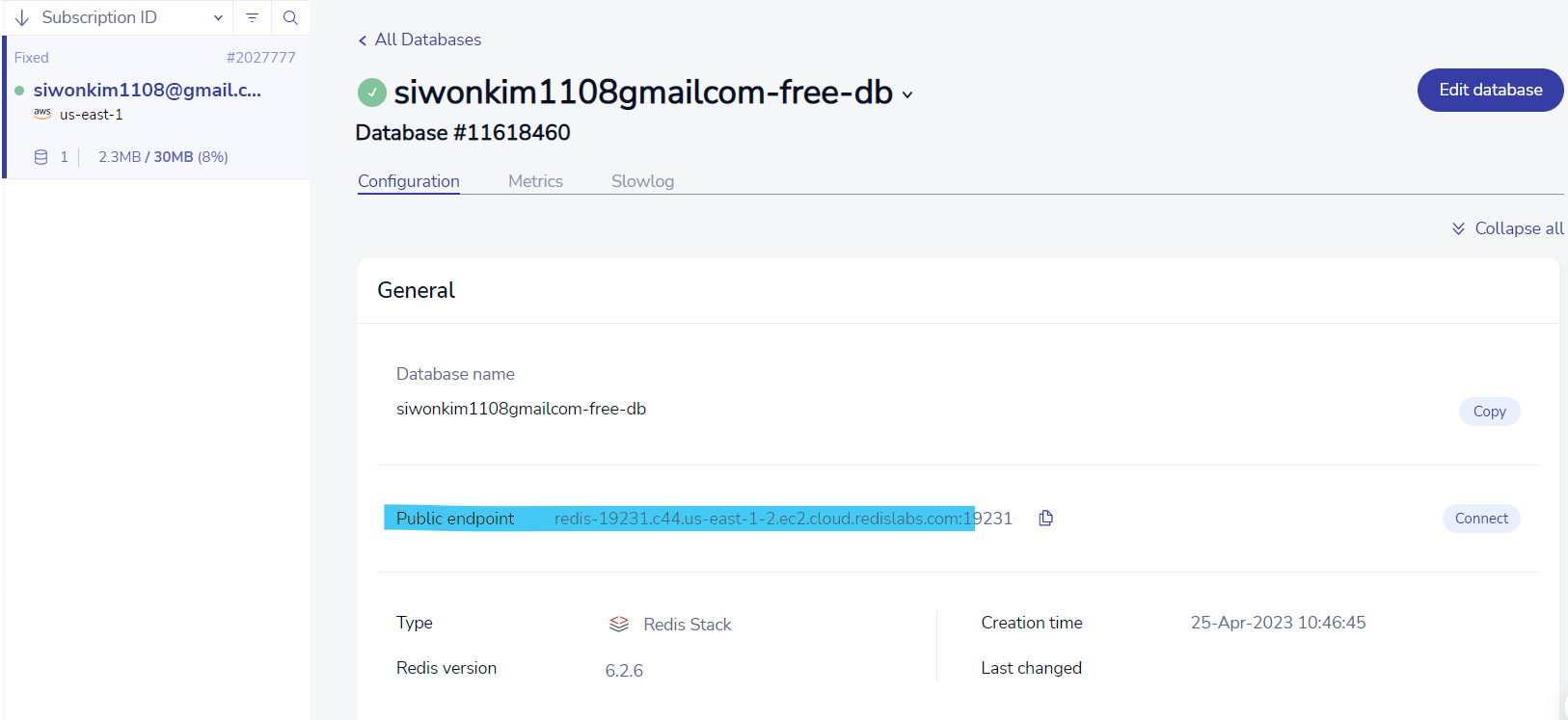
password: we can copy randomly generated password by scrolling down a bit
- On Terminal, run the following commands:
- Windows
> npm install -g redis-cli # install redis cli

> rdcli -h <host> -p <port> -a <password> # connect to redis cloud
- Linux
$ apt-get install redis-tools # install redis cli

$ redis-cli -v # check version

$ redis-cli -h <endpoint> -p <port> -a <password> # oonnect to redis cloud
- Add the environment variables
npm install dotenv: install the environment variables module.envfile will be automatically created under the root directoryEnter the following info:
# .env file
REDIS_HOST=redis-10943.c114.us-east-14.ec2.cloud.redislabs.com
REDIS_PORT=10943
REDIS_USERNAME=default
REDIS_PASSWORD=abcdefghijklmnopqrstuvwsyz
- Install redis module
npm install redis
- Connect redis to the local
- import redis and dotenv modules
const redis = require("redis");
require("dotenv").config();

const redisClient = redis.createClient({
  url: `redis://${process.env.REDIS_USERNAME}:${process.env.REDIS_PASSWORD}@${process.env.REDIS_HOST}:${process.env.REDIS_PORT}/0`,
  legacyMode: true
}); // set the legacy mode (v4 updated version is based on the Promise, but if you want to use v3 version based on the callback, you must set legacy mode_
redisClient.on('connect', () => {
   console.info('Redis connected!');
});
redisClient.on('error', (err) => {
   console.error('Redis Client Error', err);
});
redisClient.connect().then(); // connect to redis v4 (async)
const redisCli = redisClient.v4;
Use Redis in JavaScript
Save data:
let bool = await redisClient.v4.set('key', '123');Bring data:
let data = redisClient.v4.get('key');IMPORTANT: TypeError: A key should not be a Number type
Delete data:
const n = await redisCli.exists('username');-> check if exists
if(n) await redisCli.del('username');-> deleteModify data:
redisCli.rename('key', 'changed');-> if key exists, change value to 'changed'
Defind Redis Class
class RedisClientRepository {
    constructor() {
        this.redisClient = redis.createClient({
            url: `redis://${process.env.REDIS_USERNAME}:${process.env.REDIS_PASSWORD}@${process.env.REDIS_HOST}:${process.env.REDIS_PORT}/0`,
            legacyMode: true,
        });

        this.redisConnected = false;
    }

    initialize = async () => {
        this.redisClient.on("connect", () => {
            this.redisConnected = true;
            console.info("Redis connected!");
        });
        this.redisClient.on("error", (err) => {
            console.error("Redis Client Error", err);
        });
        if (!this.redisConnected) this.redisClient.connect().then(); // redis v4 connection (async)
    };

    setRefreshToken = async (refreshToken, userId) => {
        await this.initialize();
        await this.redisClient.v4.set(refreshToken, userId);
    };

    getRefreshToken = async (refreshToken) => {
        await this.initialize();
        const token = await this.redisClient.v4.get(refreshToken);
        return token;
    };

    deleteRefreshToken = async (refreshToken) => {
        await this.initialize();
        await this.redisClient.v4.del(refreshToken);
    };
}
![[코테] 그리디 문제 - 무지의 먹방 라이브](/_next/image?url=https%3A%2F%2Fcdn.hashnode.com%2Fres%2Fhashnode%2Fimage%2Fupload%2Fv1712215455263%2F1ac1f35a-8862-4e42-8d0c-e2bea01e04c0.png&w=3840&q=75)
![[코테] Bfs 토마토](/_next/image?url=https%3A%2F%2Fcdn.hashnode.com%2Fres%2Fhashnode%2Fimage%2Fupload%2Fv1709032619170%2F70056896-c857-444b-9c99-45bfcb466806.png&w=3840&q=75)
![[코테] Dfs 문제 유형 - 그래프 내에서 구분하여 카운트 하기](/_next/image?url=https%3A%2F%2Fcdn.hashnode.com%2Fres%2Fhashnode%2Fimage%2Fupload%2Fv1709019361383%2Fb0585d72-c808-4169-83a9-2724f312e927.png&w=3840&q=75)
![[코테] DFS vs BFS](/_next/image?url=https%3A%2F%2Fcdn.hashnode.com%2Fres%2Fhashnode%2Fimage%2Fupload%2Fv1708971211123%2F71f9386c-6a62-43b2-a602-4d084c24d6cf.png&w=3840&q=75)
![[코테] 여행경로](/_next/image?url=https%3A%2F%2Fcdn.hashnode.com%2Fres%2Fhashnode%2Fimage%2Fupload%2Fv1708971251412%2F27ce72ed-8ee7-4d13-a02f-ff4bbe50c4be.png&w=3840&q=75)