JavaScript - Data Type and Memory

Data Type and Memory
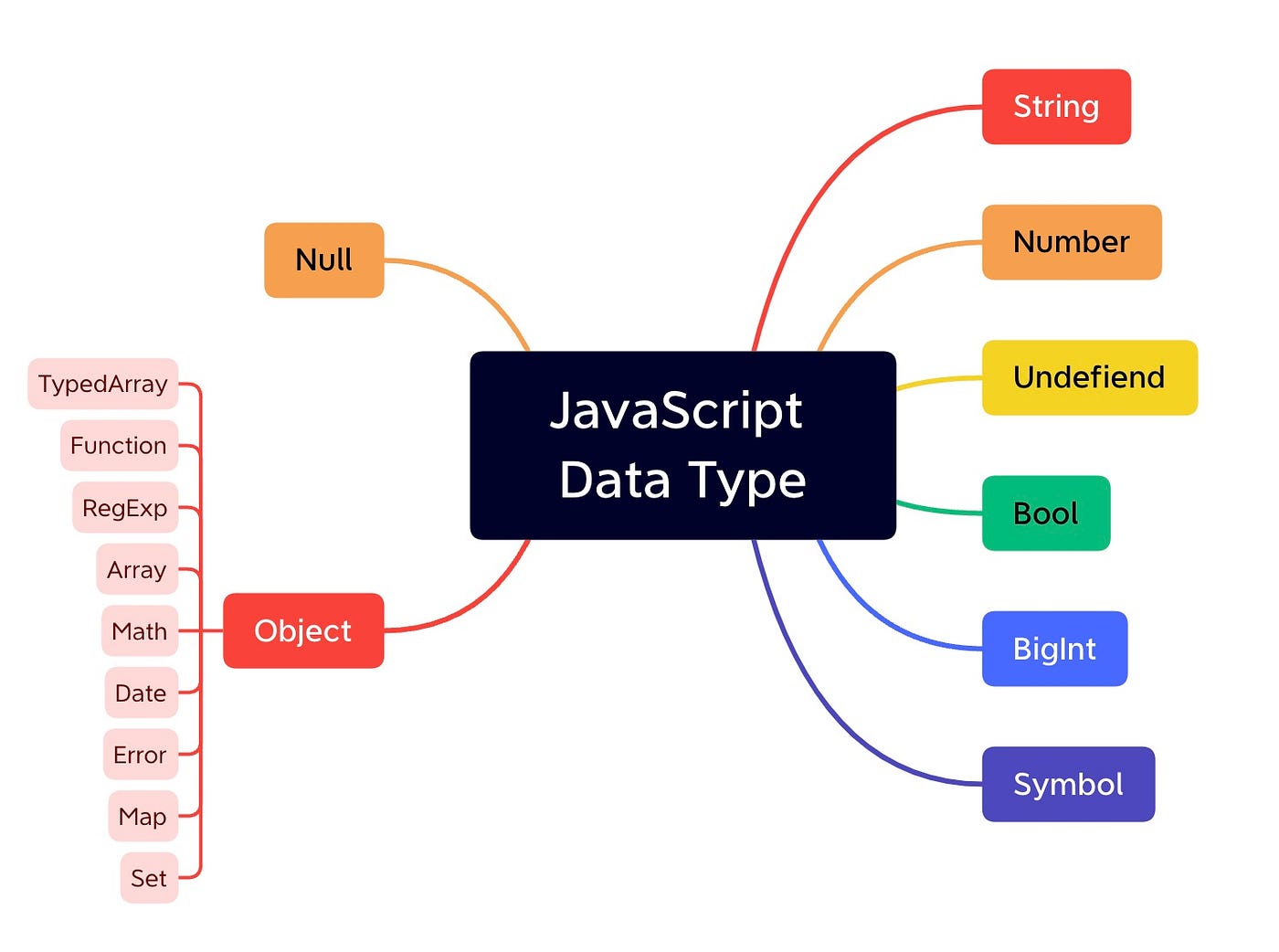
Primitive Type vs Reference Type
Primitive Type: String, Number, Undefined, Bool, BigInt, Symbol
Way to Copy: copy the address where the value is contained
Immutable
Reference Type: Object
Way to Copy: copy the address that consists of the addresses where the value is contained
Mutable
Memory & Data
Bit: 0, 1
Byte

Memory: use byte as a unit
All data are distinguished from each other through the memory address value, which is the identifier in units of bytes
For a 64-bit integer, it will be stored in 8 bytes of consecutive data
JS ->
let a = 8(8-byte)Java
byte a = 8(1-byte)short a = 8(2-byte)int a = 8(4-byte)long a = 8(16-byte)
WARNING:
let a = 8=>ais an identifier &8is a variable
Primitive Data Type
How Primitive Data Type is Loaded on the Memory
var str;
str = 'test!';

// changing data
str = 'new test!';
| Variable Address | ... | 1002 | 1003 | 1004 |
| Data | identifier: str, data: @5003->@5004 | |||
| Data Address | ... | 5002 | 5003 | 5004 |
| Data | smth else | 'test!' | 'new test!' |
Why use two different address spaces?
To convert the value flexibly (especially, when the string length is extended)
To manage memory efficiently (especially, when the same data is saved several times)
Variable vs Const
Variable: able to change the variable section
Const: unable to change the variable section
Immutable vs Mutable
Immutable: unable to change the data section => primitive data type
Mutable: able to change the data section
Garbage Collector
It refers to the role of automatically removing objects that are no longer in use from memory. JavaScript supports developers not having to explicitly manage memory by performing garbage collection. It is performed internally by the JavaScript engine, and developers cannot directly control garbage collection.
5003 data address in the example will be collected
Reference Data Type
var obj1 = {
    a: 1,
    b: "bbb",
};

// changing data in object
obj1.a = 2;
| Variable Address | 1001 | 1002 | 1003 | 1004 |
| Data | obj1/@7103~ | |||
| Data Address | 5001 | 5002 | 5003 | 5004 |
| Data | 1 | 'bbb' | 2 |
Data Address (for Obj1) | 7103 | 7104 | 7105 | 7106 |
Data | a/@5001->@5003 | b/@5002 |
Mutable
We can change the value in the data section for the object (7103 data address)
We can say the reference data type is mutable
Garbage Collector
- 5001 data address will be collected
Nested Object
var obj = {
    x: 3,
    arr: [3, 4, 5],
};

// how to search obj.arr[1]?
| Address | 1001 | 1002 | 1003 | 1004 | 1005 | ... |
| Data | obj/@7103~ | |||||
| Address | 5001 | 5002 | 5003 | 5004 | 5005 | ... |
| Data | 3 | 4 | 5 |
Address (for obj) | 7103 | 7104 | ... |
Data | x/@5001 | arr/@8104~ |
Address (for arr) | 8104 | 8105 | 8206 | ... |
Data | 0/@5001 | 1/@5002 | 2/@5003 |
Reference Counting
It is a value that indicates the number of variables or other objects that refer to an object. Objects with a reference count of 0 are no longer in use and are removed from memory by the garbage collector.
Copy Objects
WARNING: When changing a value of a key in an object after copying it from another object, it will change both objects' values since the object is mutable.
To prevent this, we can use shallow or deep copy instead of hard coding.
// STEP01. declaring
var a = 10; // primitive type
var obj1 = { c: 10, d: 'ddd' }; // reference type

// STEP02. copying
var b = a; // primitive type
var obj2 = obj1; // reference type

// STEP03. changing value
b = 15;
obj2.c = 20; // ISSUE IN MUTABLE: this will change the value of obj1.c
obj2 = { c: 20, d: 'ddd' }
| Address | 1001 | 1002 | 1003 | 1004 | 1005 | ... |
| Data | a/@5001 | obj1/@7103~ | b/@5001->@5003 | obj2/@7103~->@8104 | ||
| Address | 5001 | 5002 | 5003 | 5004 | 5005 | ... |
| Data | 10 | 'ddd' | 15 | 20 | 'ddd' |
Address (for obj1) | 7103 | 7104 | ... |
Data | c/@5001 | d/@5002 |
Address (for obj2) | 8104 | 8105 | ... |
Data | c/@5004 | d/@5005 |
Shallow Copy
var copyObject = function (target) {
    var result = {};

    // By using for ~ in, we can access all properties in object
    // No need to do hard coding
    for (var prop in target) {
        result[prop] = target[prop];
    }
    return result;
}

// -------------------------------------------------------

var user = {
    name: 'one',
    gender: 'male',
};

var user2 = copyObject(user); // shallow copy
user2.name = 'two';

if (user !== user2) {
    console.log('User info has been changed');
}

console.log(user.name, user2.name); // one two
console.log(user === user2); // false
This still has a problem - we can't do a perfect copy for the nested objects
  var user = {
      name: 'one',
      urls: {
          portfolio: 'http://github.com/abc',
          blog: 'http://blog.com',
          facebook: 'http://facebook.com/abc',
      }
  };

  var user2 = copyObject(user); // shallow copy: only copying depth 1

  user2.name = 'two';

  // able to keep immutable -> okay
  console.log(user.name === user2.name); // false

  // unable to keep immutable -> not okay (change both objects)
  user.urls.portfolio = 'http://portfolio.com';
  console.log(user.urls.portfolio === user2.urls.portfolio); // true

  user2.urls.blog = '';
  console.log(user.urls.blog === user2.urls.blog); // true
Deep Copy
- We should do shallow copy for the nested object as well -> recursively
var copyObjectDeep = function(target) {
    var result = {};
    if (typeof target === 'object' && target !== null) {
        for (var prop in target) {
            result[pop] = copyObjectDeep(target[prop]);
        }
    } else {
        result = target;
    }
    return result;
}

// -------------------------------------------------------

var obj = {
    a: 1,
    b: {
        c: null,
        d: [1, 2],
    }
};
var obj2 = copyObjectDeep(obj); // deep copy

obj2.a = 3;
obj2.b.c = 4;
obj2.b.d[1] = 3;
Undefined vs. Null
Undefined
If a value is expected in the JavaScript engine but is not present, it is automatically assigned.
var a;
console.log(a); // (1) access undefined variable

var obj = { a: 1 };
console.log(obj.a); // 1
console.log(obj.b); // (2) access non-existing property
// console.log(b); // error

var func = function() { };
var c = func(); // (3) function with no return
console.log(c); // undefined
Null
The developer explicitly specifies that there is no value.
typeof null: object -> JS bug
var n = null;
console.log(typeof n); // object

// equality operator
console.log(n == undefined); // true
console.log(n == null); // true

// identity operator
console.log(n === undefined); // false
console.log(n === null); // true
![[코테] 그리디 문제 - 무지의 먹방 라이브](/_next/image?url=https%3A%2F%2Fcdn.hashnode.com%2Fres%2Fhashnode%2Fimage%2Fupload%2Fv1712215455263%2F1ac1f35a-8862-4e42-8d0c-e2bea01e04c0.png&w=3840&q=75)
![[코테] Bfs 토마토](/_next/image?url=https%3A%2F%2Fcdn.hashnode.com%2Fres%2Fhashnode%2Fimage%2Fupload%2Fv1709032619170%2F70056896-c857-444b-9c99-45bfcb466806.png&w=3840&q=75)
![[코테] Dfs 문제 유형 - 그래프 내에서 구분하여 카운트 하기](/_next/image?url=https%3A%2F%2Fcdn.hashnode.com%2Fres%2Fhashnode%2Fimage%2Fupload%2Fv1709019361383%2Fb0585d72-c808-4169-83a9-2724f312e927.png&w=3840&q=75)
![[코테] DFS vs BFS](/_next/image?url=https%3A%2F%2Fcdn.hashnode.com%2Fres%2Fhashnode%2Fimage%2Fupload%2Fv1708971211123%2F71f9386c-6a62-43b2-a602-4d084c24d6cf.png&w=3840&q=75)
![[코테] 여행경로](/_next/image?url=https%3A%2F%2Fcdn.hashnode.com%2Fres%2Fhashnode%2Fimage%2Fupload%2Fv1708971251412%2F27ce72ed-8ee7-4d13-a02f-ff4bbe50c4be.png&w=3840&q=75)